
Gigabyte TRX50 AERO D: a practical Threadripper platform between desktop and workstation
Gigabyte’s TRX50 AERO D is an EEB/E-ATX motherboard built around AMD’s TRX50 chipset and the sTR5 socket. Its purpose is unusually clear: provide a high-end desktop platform for Ryzen Threadripper and Threadripper Pro 7000/9000 CPUs without stepping all the way up to the larger WRX90 workstation ecosystem. That makes it relevant for content creation, local AI development, GPU-heavy engineering work, virtualization labs and power users who need more I/O than Ryzen can offer.
The board measures 12 by 10.4 inches, so case selection is an operational requirement, not an afterthought. It supports four RDIMM slots in a one-DIMM-per-channel layout. TRX50 provides four DDR5 channels, and Gigabyte specifies EXPO support up to DDR5-8000, while the platform’s contemporary JEDEC reference point is DDR5-6400. Populate all four RDIMM slots for the intended configuration; TRX50 does not support 2DPC.
CPU compatibility and power design
TRX50’s key attraction is processor flexibility. The AERO D accepts both standard Threadripper and Threadripper Pro processors across the 7000-series Zen 4 and 9000-series Zen 5 families. Compared with WRX90, TRX50 limits the platform to four memory channels and 80 CPU PCIe lanes, but that trade-off reduces board complexity while retaining a serious expansion budget.
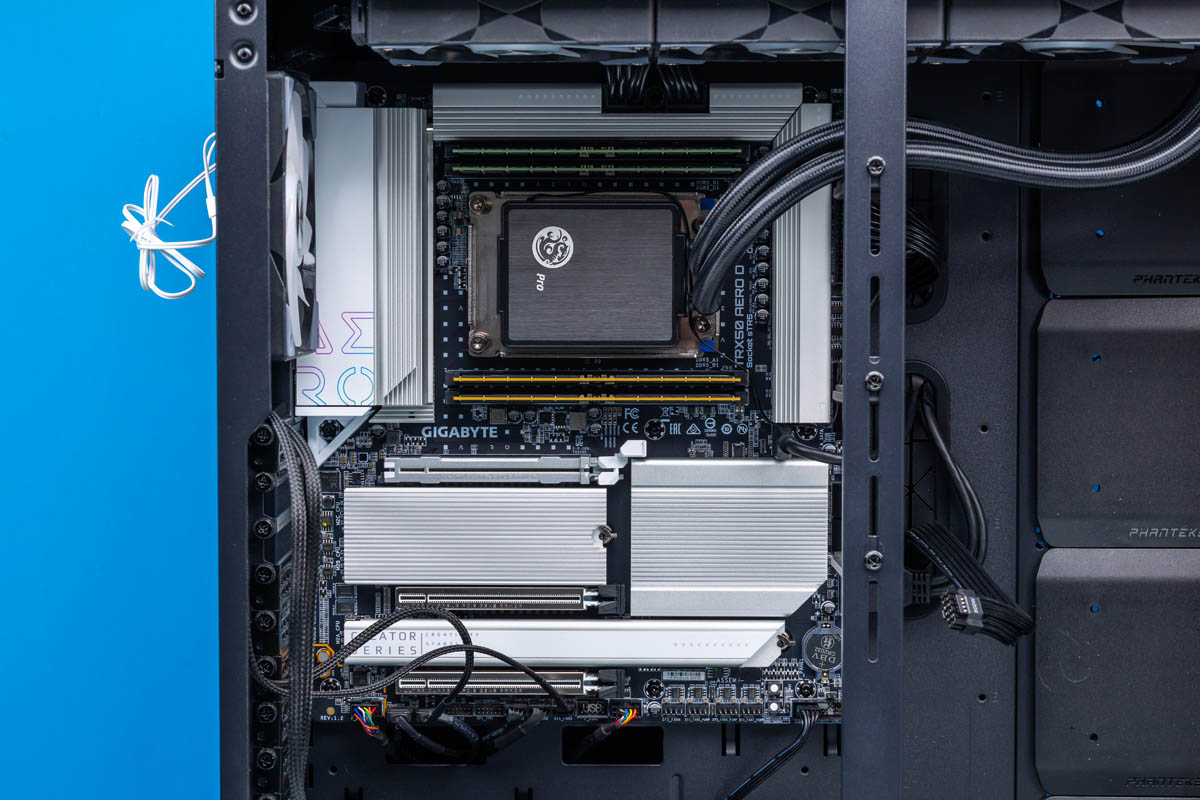
Gigabyte uses a 16+8+4 power-stage arrangement: 16 phases for CPU vCore, eight for the SoC and I/O domain, and four for PCIe and related functions. Support extends to processors with a 350 W base TDP. Two 8-pin 12 V CPU power connectors supplement the 24-pin ATX connector. Large VRM heatsinks wrap three sides of the socket and include an 8 mm heatpipe; plan case airflow carefully when running sustained rendering, compilation or GPU training workloads.

Expansion, storage and network layout
The layout prioritizes breathing room for high-power cards. Two reinforced full-length PCIe slots run at PCIe 5.0 x16 electrically. A third full-length slot runs at PCIe 4.0 x16 and suits storage, networking or accelerator cards that do not need the top-tier GPU position. Gigabyte deliberately uses three rather than four x16 slots, leaving physical space between cards and allocating intervening board area to M.2 storage.
There are four M.2 sockets: three PCIe Gen5 x4 sockets supporting 22110 and 2280 drives, plus one Gen4 x4 2280 socket. All are heatsink-covered. Eight SATA 6 Gb/s ports handle bulk or legacy storage, but there are no MCIO or SlimSAS connectors. For an admin designing a dense build, that means NVMe and SATA are the native internal storage paths; validate HBA requirements before purchasing.
Networking is split between 10GbE through a Marvell AQC113C controller and 2.5GbE through a Realtek RTL8125 controller. Wireless comes from Qualcomm QCNCM865, providing Wi-Fi 7 and Bluetooth 5.3. This is useful for a studio or lab, but it is not a server board: there is no BMC, dedicated management Ethernet or remote-console stack.
USB and deployment checklist
Rear I/O includes two 40Gbps USB-C ports, four 10Gbps USB-A ports and four 5Gbps USB-A ports. The USB-C ports use Intel’s JHL8540 controller because TRX50 lacks native USB4. They are officially USB4 rather than Thunderbolt 4 certified; the left port supports DisplayPort Alt Mode when a discrete GPU is connected to the board’s DisplayPort input. Threadripper CPUs have no integrated display output. Front-panel headers add one 20Gbps USB-C, two 5Gbps USB-A and four USB 2.0 ports. Audio is basic Realtek ALC4080 two-channel output, with Q-Flash Plus available for USB BIOS updates.
- Confirm the chassis supports the 12 x 10.4-inch EEB/E-ATX board and leaves GPU intake clearance.
- Choose four compatible RDIMMs; do not plan a 2DPC memory topology.
- Budget two 8-pin CPU power leads and cooling for a 350 W-class CPU.
- Map GPUs, HBAs and NICs across two Gen5 x16 and one Gen4 x16 slot before ordering.
- Verify that USB4—not Thunderbolt certification—meets peripheral requirements.
- Use Q-Flash Plus and validate BIOS support before installing a newer Threadripper 9000 CPU.
Conclusion
The TRX50 AERO D is a focused compromise: fewer memory channels and enterprise-management features than WRX90, but substantial PCIe, Gen5 M.2, 10GbE and USB4 for a high-performance creator or AI workstation. Its strongest fit is a carefully planned single-user system needing Threadripper-class compute without a full workstation-platform bill of materials.
Source: ServeTheHome, Gigabyte TRX50 AERO D Motherboard Review.